All-in-one Android screen recorder with in-app editing tools
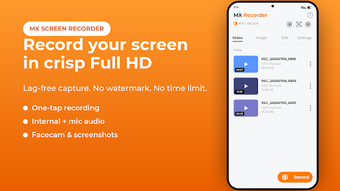
MX Screen Recorder, from Logic Worms Pvt ltd, is an Android app built to capture on-screen activity and produce finished clips on the device. It records displays and equips creators with in-app trimming, merging, and basic post-production so clips are ready to share. The app pairs quick-access recording controls with screenshot editing and GIF conversion for same-device finishing. Mobile content makers who prefer an integrated capture-to-export workflow gain faster turnaround and fewer app switches.

Unlock your creativity with Adobe Stock
Get 10 images or 1 video with a free trial
What is MX Screen Recorder used for?
MX focuses on capturing live device activity and packaging that footage for direct use. It supports features aimed at straightforward capture: a draggable floating control bubble for one-tap recording, a facecam overlay to record reactions, and options for microphone or system audio. The app also offers gesture controls like shake-to-stop and a countdown timer to help start recordings precisely without external tools.
How well does MX handle high-resolution or long recordings?
MX records up to Full HD (1080p) with adjustable FPS and bitrate, and the product notes optimized, lag-free performance for high-frame-rate gaming capture. There are no stated recording time limits, so long sessions such as gameplay or meetings are possible. Internal audio capture is available, although that capability requires Android 10 or newer due to platform restrictions.
Is MX suitable for beginners or professionals?
The app supports quick onboarding through its floating bubble and simple countdown, letting novices start without menus. For more‑detailed edits, the built-in video editor provides trimming, merging, rotation, speed changes, compression, and adding music or text, while the screenshot tool includes blur, pixelate, and drawing. That combination lets casual users produce polished clips and gives power users basic on-device finishing tools.
How does the export quality compare to similar tools?
Exports come from the app's native recorder and editor, and the workflow includes a GIF maker to convert video segments and a screenshot annotation suite for final touches. Unlike many free recorders, MX removes watermarks and has no time restrictions on output. User feedback highlights the lack of watermarks and convenient editing, while some reports mention the presence of standard in-app advertisements during use.
In conclusion, MX is a practical choice for creators seeking one-app capture and finishing
In conclusion, MX is a practical option for creators who want device-based recording plus basic editing without switching apps, supported by Logic Worms' experience building utility and multimedia tools. User commentary cites clean output and ease of use as strengths. Expect the app to prioritize mobile convenience and an integrated workflow rather than matching desktop-level production suites.